Go beyond your own store’s history. Add country network insights and machine learning, with advanced rules, online advance payments and protection that follows the customer through payment retries.
—stores across the network
—
✓
Easy setup with your existing settings. Smart COD AI imports your Free settings for you to review and save.
✓
Easy to return to Free. Deactivate Smart COD AI and reactivate Free with your previous settings.
Card required. Cancel before the trial ends to avoid a charge.
THE Smart COD AI DIFFERENCE
A new customer here can already have a delivery history.
COUNTRY NETWORK
See further than your own orders.
A customer’s first order with you may not be their first COD order. Eligible delivery history from connected stores in the same country gives your protection more context before you dispatch.
Use delivery history to apply your chosen protection and keep COD available for customers who meet your successful-delivery criteria. You can also choose store-only history.
MACHINE LEARNING
Turn order context into a risk signal.
Machine learning estimates non-collection risk using delivery outcomes and order context. When an ML score is available, your threshold and saved rules determine the checkout response.
You set the action: hide COD, request an advance payment or ask for email verification. The decision audit shows whether ML contributed to that decision.
MUCH MORE THAN A NETWORK UPGRADE
The advanced COD tools you did not have in Free.
Move up to a complete COD toolkit, including capabilities previously reserved for PRO. Every Smart COD AI plan includes the same protection features; only the number of connected stores changes.
PROTECTION AFTER A FAILED CARD PAYMENT
Switching to COD should not bypass your rules.
On WooCommerce’s payment page for an existing unpaid order, Smart COD AI checks the saved order again. Your restrictions, COD fee, advance payment and email verification still apply when the customer changes payment method.
The customer’s card payment fails.
They reopen the order and choose COD.
Smart COD AI applies your configured protection before payment.
30
30 types of conditions
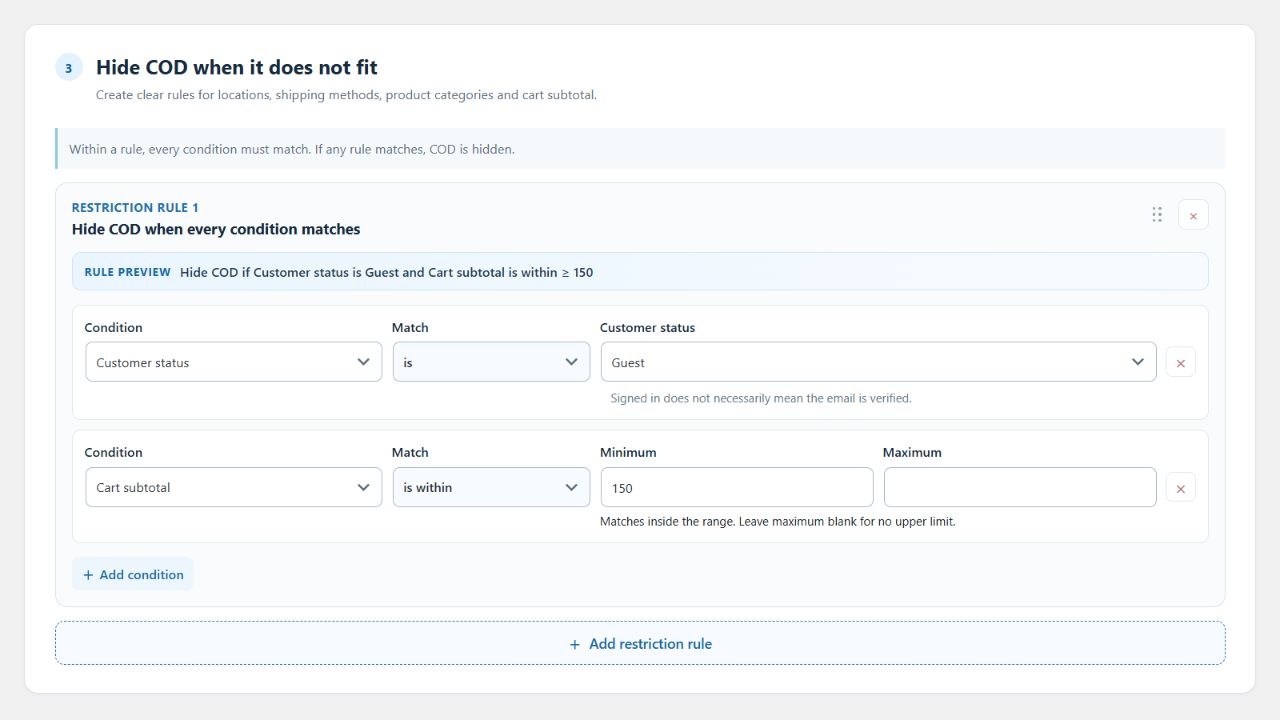
Combine coupons, SKU, stock, backorders, quantities, weight and customer details with destination and cart amounts. Build rules that fit the way your store sells.
%
Conditional COD fees
Set fixed or percentage fees for different cases. Arrange the rules in priority order; the first matching fee applies.
½
An advance now. The rest on delivery.
Request a fixed amount or percentage online when your rules match. The customer sees what they pay now and what remains payable on delivery.
@
An email check before COD
Ask the customer to confirm a six-digit email code, without creating an account. Add a confirmation step where your policy calls for it.
Network, ML settings and the complete toolkit are included in every Smart COD AI plan.
Use a guided WooCommerce panel with a readable preview of each rule. Review your setup, save it and see the reasons behind your checkout decisions.
A decision audit you can actually use
Filter by date and outcome, inspect the recorded checks and open the linked order when available. Follow decisions from your store’s panel or your Smart COD AI account.
Courier evidence, beyond a cancelled status
With available tracking from a supported service, distinguish reported delivery, return and explicit refusal. An order cancellation alone is not proof of refusal.
Actual Smart COD AI settings panel. Example conditions shown in English.
Fits your WooCommerce setup
Classic checkout, Checkout Blocks and HPOS. FOX / WOOCS for currency conversion; Pixel Manager for measuring advance-payment orders without counting the payment order as a second purchase. Includes vendor conditions for Dokan and WCFM.
A FAMILIAR START
Keep your settings. Unlock more possibilities.
Smart COD AI detects your Free settings and fills in an editable preview. Review and save them, then choose which new protections to add. Your WooCommerce orders and previous settings are preserved.
If you decide not to continue after the trial
Cancel your subscription from your Smart COD AI account before the trial ends to avoid a charge. Then deactivate Smart COD AI and reactivate Free from your WordPress plugins. Your previous Free settings are preserved. Deactivating the plugin does not cancel the subscription.
Start your trial and bring your settings
Start your 7-day trial
Choose a plan for the number of stores you need and create your Smart COD AI account.
Install and bring your settings
Install Smart COD AI, approve the store connection and choose “Import my settings”. Your previous Smart COD plugin stays active until you successfully save the Smart COD AI settings.
Review, save and take control
The preview does not apply changes. Save your reviewed setup to enable protection, then test checkout. You can return to the Import settings tab later.
 smartcod